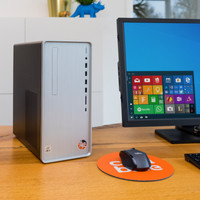
As a former PC gamer and after years of console gaming, I finally bought a GAME PC.
I didn't really feel like building one myself and this Lenovo turned out to be a very complete system and also on sale, which made building one myself really too expensive.
I've been using the PC for a few months now and I'm generally very happy with it.
I play in combination with a new QD-Oled Ultrawide with 240Hz support.
It's fast and plays almost everything on ultra settings.
The latest games (like Indiana Jones and the Great Circle) at 90+ FPS and previous games at 120+ fps (most much more).
(Full Ray-tracing NOT possible, only basic RT!!!)
The PC is equipped with a 1TB M.2 SSD, which fills up quite quickly.
When searching (online) for expansion options, it's hard to find the right information. By unscrewing it and removing the video card you will find 2 extra M.2 SSD slots (PCIe 4.0).
I used one of the slots for expansion with a Samsung 2TB 990Pro with heatsink (which fits perfectly under the video card).
However, the "Samsung Magician" software does not find the SSD... CrystalSiskInfo offers a solution and does see it... CrytsalDiskMark can also test it for speed.
When testing, I only achieved half of the advertised speed.
After thorough research, it appears in the small print that it concerns a PCIe-4.0x4 slots, but these only appear to run on PCIe-4.0x2 due to limitations in the chipset (!).
That should have been mentioned in the product description of the Lenovo!!! From a system like this and in the current time you simply expect to be able to use full support and the full speed on this component!!!
Expanding working memory:
Expanding the working memory also appears to be impossible. Where there is excellent DDR5 memory built in, expansion with exactly the same modules appears to be impossible. This is because these modules are simply not available separately anywhere.
If you want to expand the memory, you are dependent on replacing it completely with new modules of the same brand/series.
This is because it is advised not to use modules from different brands and series next to each other because this is prone to failure.
The Warranty Period.
"Lenovo Vantage" is installed on the Lenovo, which can be used to find a lot, including the warranty period.
This turned out to have already started in April 2024, while I only purchased it in December 2024 and started it up for the first time.
So you have to request a correction for this from Lenovo yourself... This takes about 2 days, but it does have to be corrected.
Furthermore, it is a fast and complete system that I can use well for the time being. Games run smoothly and I enjoy them a lot
But after my own experiences, you quickly find out why the system seems very interesting as a pre-build, but can still have serious shortcomings that you can discover (much) later.